Create Bonus
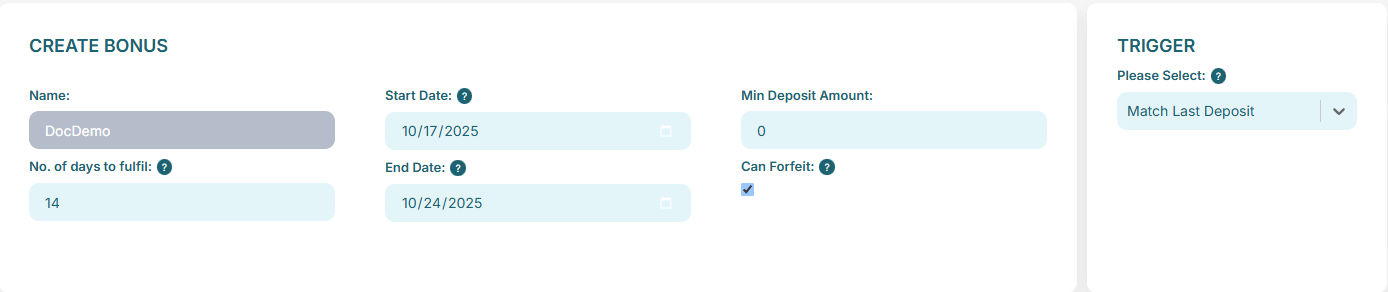
The first section of the create bonus screen allows the operator to set the high level details/terms such as name, start date, end date, number of days the player has to fulfil after claim and whether the bonus can be forfiet.

If the trigger is a deposit trigger then a min deposit amount is also available, required for the player to be eligible. (see Triggers)
Triggers
Depending on your selected configuration there are various trigger options. See below for full list.
If using our third party CRM integration then the only required triggers are 'No Trigger' and 'Match Last Deposit'.
- NO_TRIGGER - Direct (instant) bonus allocation including funds.
- DEPOSIT - Allocation triggered by a player deposit.
- USER_REGISTERED - Allocation on player registration.
- FIRST_DEPOSIT - Allocation on players first deposit.
- SECOND_DEPOSIT - Allocation on players second deposit.
- THIRD_DEPOSIT - Allocation on players third deposit.
- FOURTH_DEPOSIT - Allocation on players fourth deposit.
- FIFTH_DEPOSIT - Allocation on players fifth deposit.
- MATCH_LAST_DEPOSIT - When the bonus is allocated, use the players last deposit to determine amount and currency.
All deposit triggers will use the players last deposit to determine amount and currency.
Casino Free Bets
In this section the operator has the option to add a free bet offer to the bonus. Or leave empty if cash offer is wanted independently.
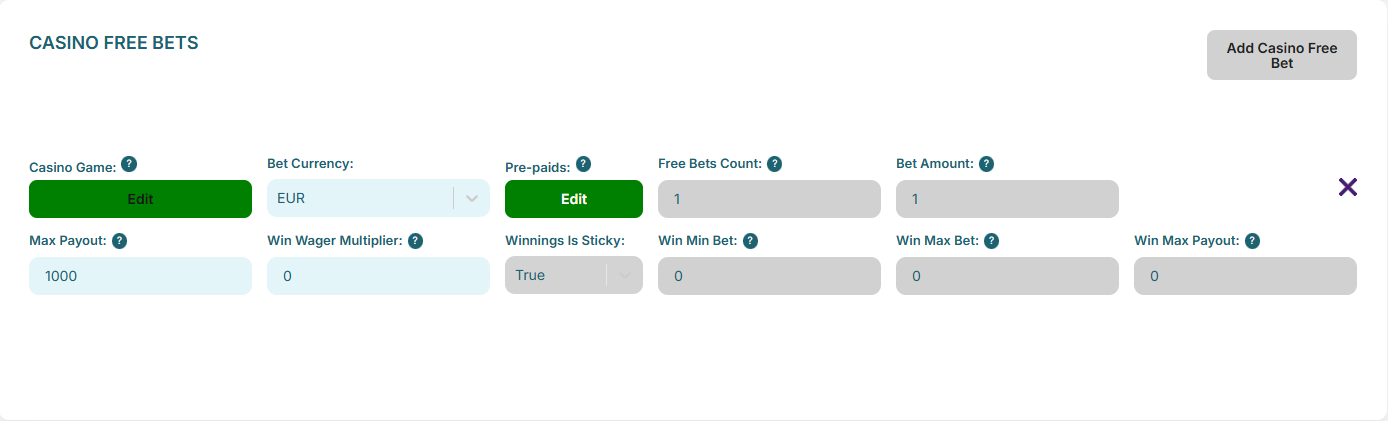
The operator will need to fill in the fields as follows:
- Select a Casino Game - Select from games with free bets available, see Select Game.
- Bet Currency - Choose a currency.
- Pre-paids - Select a pre-paid from those available for the selected game, see Select Prepaid.
- Free Bets Count - Enter the number of free bets to issue. This will be disabled if the number is determined by the selected pre-paid.
- Bet Amount - Enter the bet amount for each free bet. This will be disabled if the amount is determined by the selected pre-paid.
- Max Payout - Set the maximum payout for free bet wins.
- Win Wager Multiplier - Set wagering multiplier to apply to offer winnings. i.e 10 = apply a 10 x rollover to the winnings before player can withdraw. !NOTE! - if set to 0 winnings will be returned to real money wallet for immediate withdrawal.
If 'Win Wager Multiplier' is set to amount greater than 0.
- Winnings Is Sticky - Set whether or not the winnings are sticky.
- Win Min Bet - Set the minimim bet terms for the winnings.
- Win Max Bet - Set the maximum bet terms for the winnings.
- Win Max Payout - Set the maximum payout for bets placed with winnings.
Use the tooltips for helpful field descriptions.
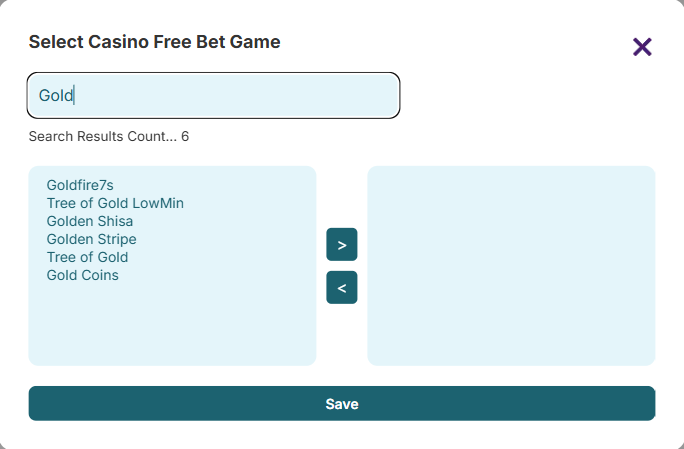
Select Game
Search for the game to issue the free bet for and move to right hand box, then click save.
NOTE - not all games are free bet compatible.
Select Prepaid
For the selected game, the operator can choose from a list of pre-paid options.
Depending on the selected game, the options will determine the bet count and value.
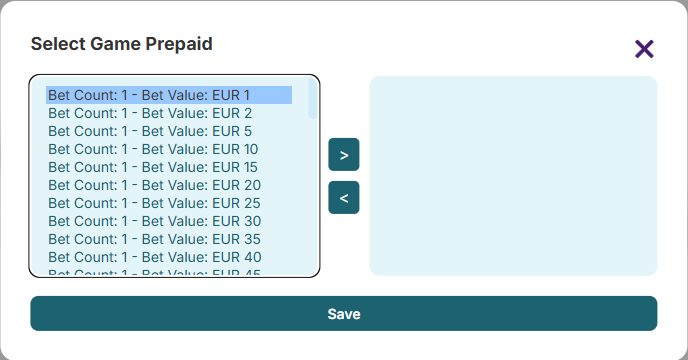
Or the bet count will be 'Any' and the bet value will be selectable. In this case the operator can set the bet count in the Casino Free Bets section.
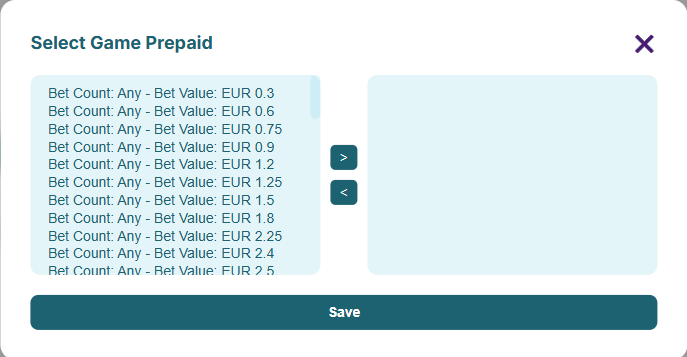
Casino Cash Offers
In this section the operator has the option to add a cash offer to the bonus. Or leave empty if free bet offer is wanted independently.
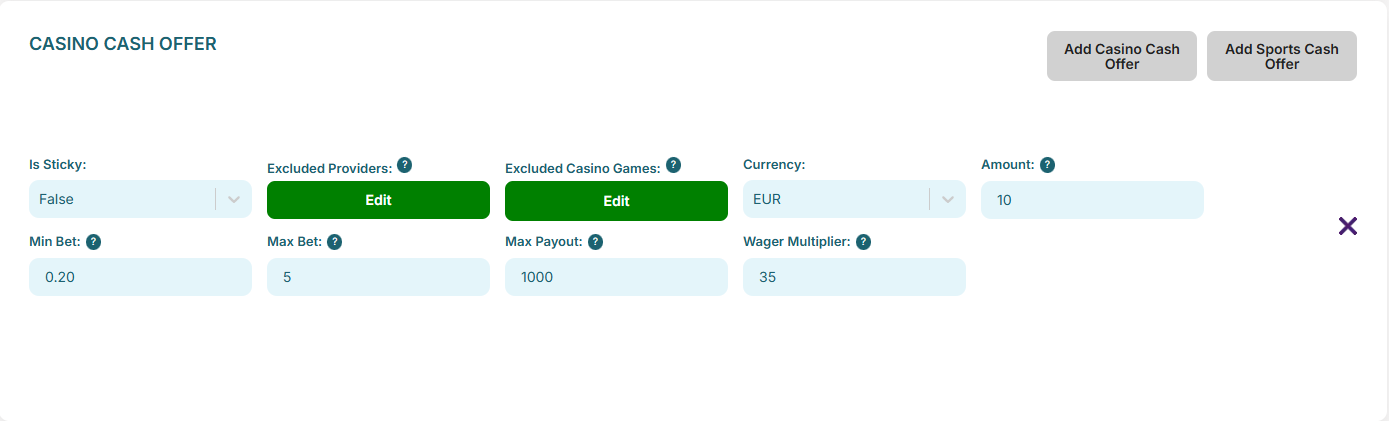
The operator will need to fill in the fields as follows:
- Is Sticky - select true/false to detetmine if the offer is sticky or non-sticky.
- Excluded Providers - exclude any game providers from the offer.
- Excluded Casino Games - exclude any specific games from the offer.
- Currency - select the offer currency.
- Amount - enter the amount to be awarded.
- Min Bet - enter the minimum bet terms for the offer.
- Max Bet - enter the maximum bet terms for the offer.
- Max Payout - enter the maximum payout amount allowed when bonus funds become real.
- Wager Multiplier - Set wagering multiplier to apply to offer. i.e 10 = apply a 10 x rollover before player can withdraw.
Use the tooltips for helpful field descriptions.
If the offer is for a bonus with a depost trigger the fields required are slightly different. See list to follow.
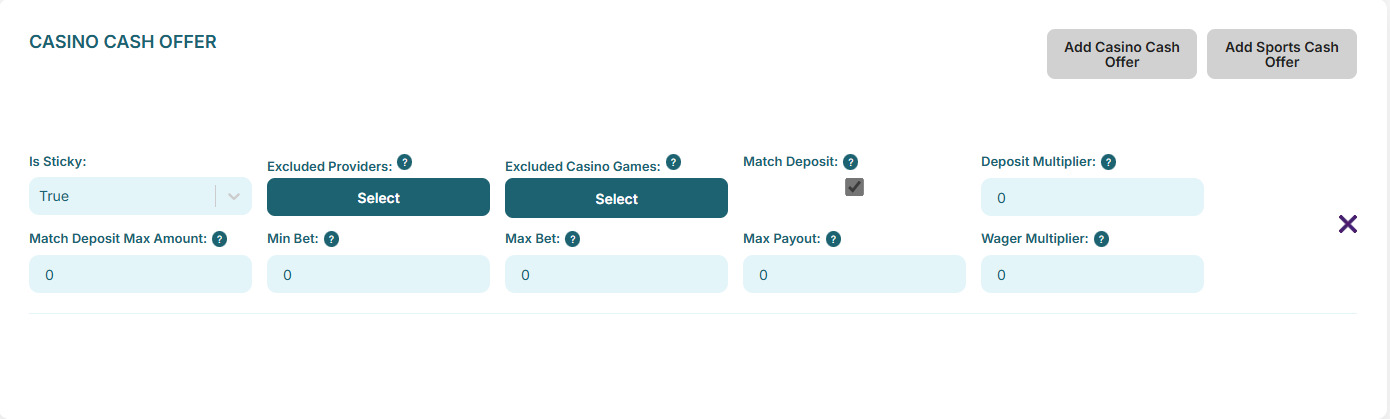
The operator will need to fill in the fields as follows:
- Is Sticky - select true/false to detetmine if the offer is sticky or non-sticky.
- Excluded Providers - exclude any game providers from the offer.
- Excluded Casino Games - exclude any specific games from the offer.
- Match Deposit - select whether or not amount and currency are determined by players deposit. (disabled and selected in some trigger cases)
- Deposit Multiplier - enter a multiplier for the funds to be determined from deposit amount. i.e. If an offer has a 10x multiplier and a player deposits 10 EUR, the awarded funds will be 100 EUR.
- Match Deposit Max Amount - enter the maximum amount a player can deposit that the platform will match. i.e. If set to 10 and a player deposits 20 EUR then 10 EUR will be awarded.
- Min Bet - enter the minimum bet terms for the offer.
- Max Bet - enter the maximum bet terms for the offer.
- Max Payout - enter the maximum payout amount allowed when bonus funds become real.
- Wager Multiplier - Set wagering multiplier to apply to offer. i.e 10 = apply a 10 x rollover before player can withdraw.
Use the tooltips for helpful field descriptions.
Sports Cash Offers
In this section the operator has the option to add a cash offer to the bonus. Or leave empty if free bet offer is wanted independently.
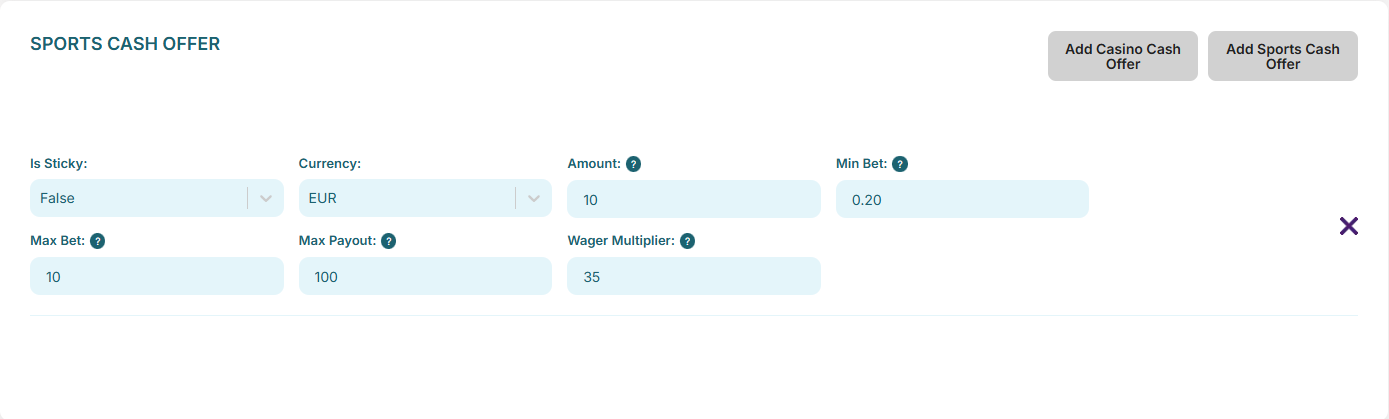
The operator will need to fill in the fields as follows:
- Is Sticky - select true/false to detetmine if the offer is sticky or non-sticky.
- Currency - select the offer currency.
- Amount - enter the amount to be awarded.
- Min Bet - enter the minimum bet terms for the offer.
- Max Bet - enter the maximum bet terms for the offer.
- Max Payout - enter the maximum payout amount allowed when bonus funds become real.
- Wager Multiplier - Set wagering multiplier to apply to offer. i.e 10 = apply a 10 x rollover before player can withdraw.
If the offer is for a bonus with a depost trigger the fields required are slightly different. See list to follow.
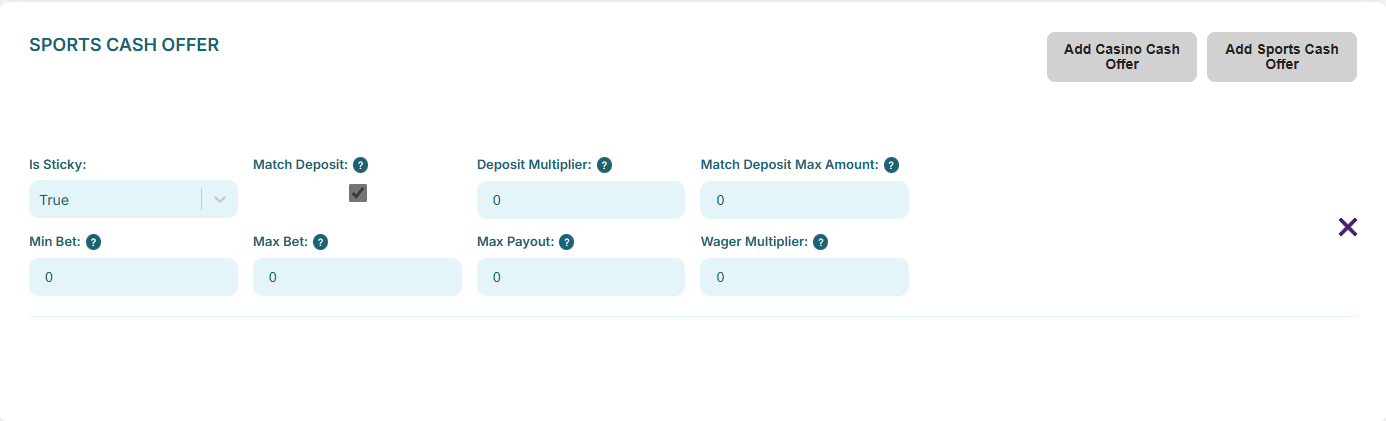
The operator will need to fill in the fields as follows:
- Is Sticky - select true/false to detetmine if the offer is sticky or non-sticky.
- Match Deposit - select whether or not amount and currency are determined by players deposit. (disabled and selected in some trigger cases)
- Deposit Multiplier - enter a multiplier for the funds to be determined from deposit amount. i.e. If an offer has a 10x multiplier and a player deposits 10 EUR, the awarded funds will be 100 EUR.
- Match Deposit Max Amount - enter the maximum amount a player can deposit that the platform will match. i.e. If set to 10 and a player deposits 20 EUR then 10 EUR will be awarded.
- Min Bet - enter the minimum bet terms for the offer.
- Max Bet - enter the maximum bet terms for the offer.
- Max Payout - enter the maximum payout amount allowed when bonus funds become real.
- Wager Multiplier - Set wagering multiplier to apply to offer. i.e 10 = apply a 10 x rollover before player can withdraw.
Use the tooltips for helpful field descriptions.
Actions
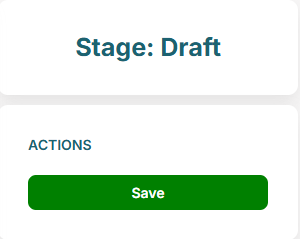
Figure 1: Create Bonus Action Panel
Actions
- Save — Save the bonus as 'Draft'.